
About Anew
Anew Senior Placement is a small agency in Fresno, California. When a family needs assisted living or memory care for a parent, Anew's advocates learn what the person needs and what the family can afford, shortlist facilities, book tours, and stay with the family until move-in. The agency is paid a placement fee by the facility once the client is admitted.
The work runs on follow-up. A typical client involves dozens of calls, texts and tours over several weeks, and the agency is open every day of the year, holidays included.
The problem: three systems and a daily rebuild
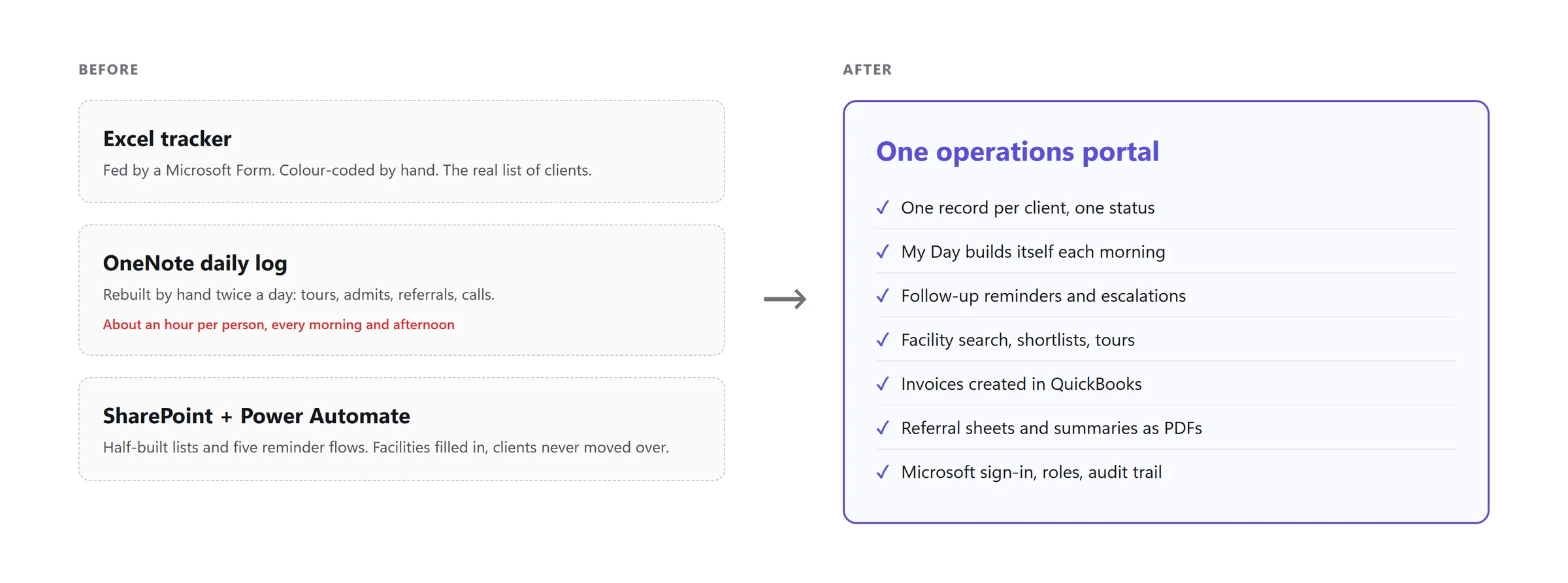
When we started in August 2026, Anew's operations lived in three places:
- An Excel tracker, fed by a Microsoft Form and colour-coded by status by hand. This was the real list of clients.
- A OneNote page that each person rebuilt every morning and again every afternoon, listing the day's tours, admits, new referrals and calls. By the team's estimate, it took about an hour per person each time.
- A SharePoint site with five Power Automate reminder flows. The facilities list was mostly filled in. The client list never got past testing.
What hurt most was what nobody saw. A client sitting in "Pending" with no next contact date didn't show up anywhere, so nobody called. On some days the same person appeared in the OneNote log as pending, as someone to call, and as ready to invoice, all at once.
Before writing any code, we agreed on one test of success: everyone opens one page in the morning and knows what to do that day, and nobody rebuilds the OneNote page again.
What we built
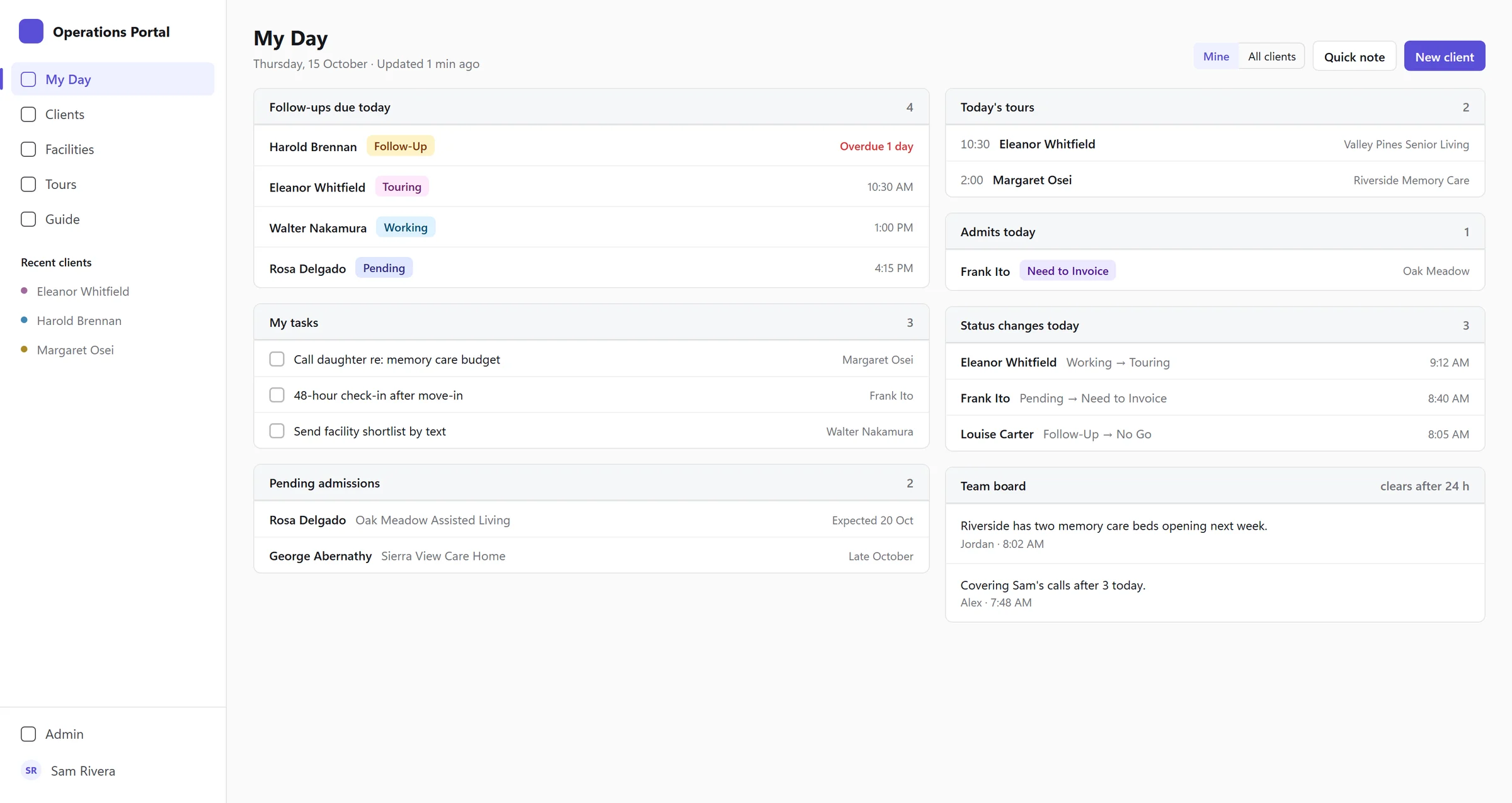
My Day: the page that replaced the OneNote log
Every staff member signs in to My Day. It shows their follow-ups due today (overdue ones in red), today's tours, admits, pending admissions, their own tasks, and every status change made today. A team board in the corner holds the short notes people used to put at the top of the OneNote page, and it clears itself after 24 hours.
Nobody has to put this page together. It is built from the client records and refreshes every two minutes, and unfinished tasks carry over to the next day on their own.
One record and one status per client
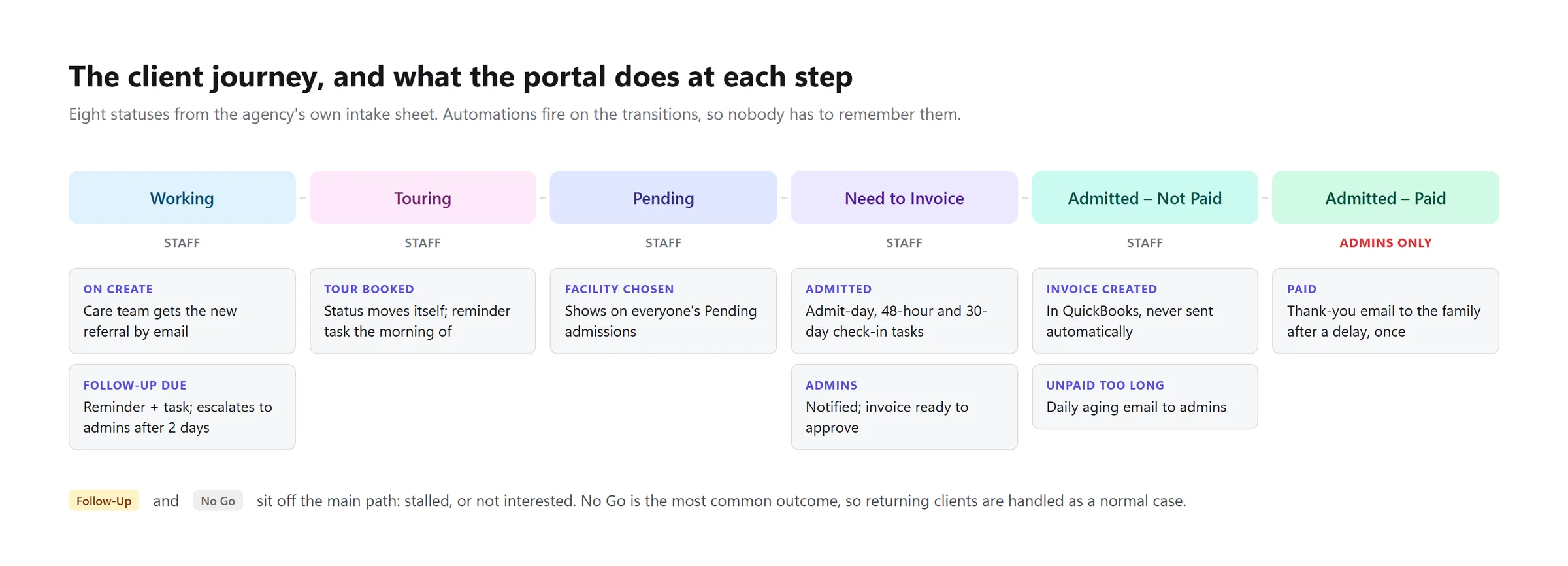
Each client has one record holding the intake form exactly as Anew prints it, family contacts, a notes timeline, tasks, tours and a facility shortlist. Each client also has one status, taken from Anew's own intake sheet: Working, Touring, Pending, Need to Invoice, Admitted - Not Paid and Admitted - Paid, plus Follow-Up and No Go off the main path.
The reminders run on those statuses, so nobody has to remember them. When a follow-up date passes with no new note, the advocate gets an email and a task. Two days later, an admin gets an escalation. Admission creates the admit-day, 48-hour and 30-day check-in tasks. Only an admin can mark a placement as paid. The server checks that rule on every request, whatever the screen shows.
Facility search, shortlists and "copy for text"
Advocates search and filter the facility list, build a shortlist for each client, and book tours against it. The first thing Ron Plummer, Anew's Care Advocate and CFO, asked for after the demo was a single button. His staff were retyping the same facility details into text messages all day, so now one click copies a ready-to-send text with the facility's name, address, phone and the tour time.
Billing that ends in QuickBooks
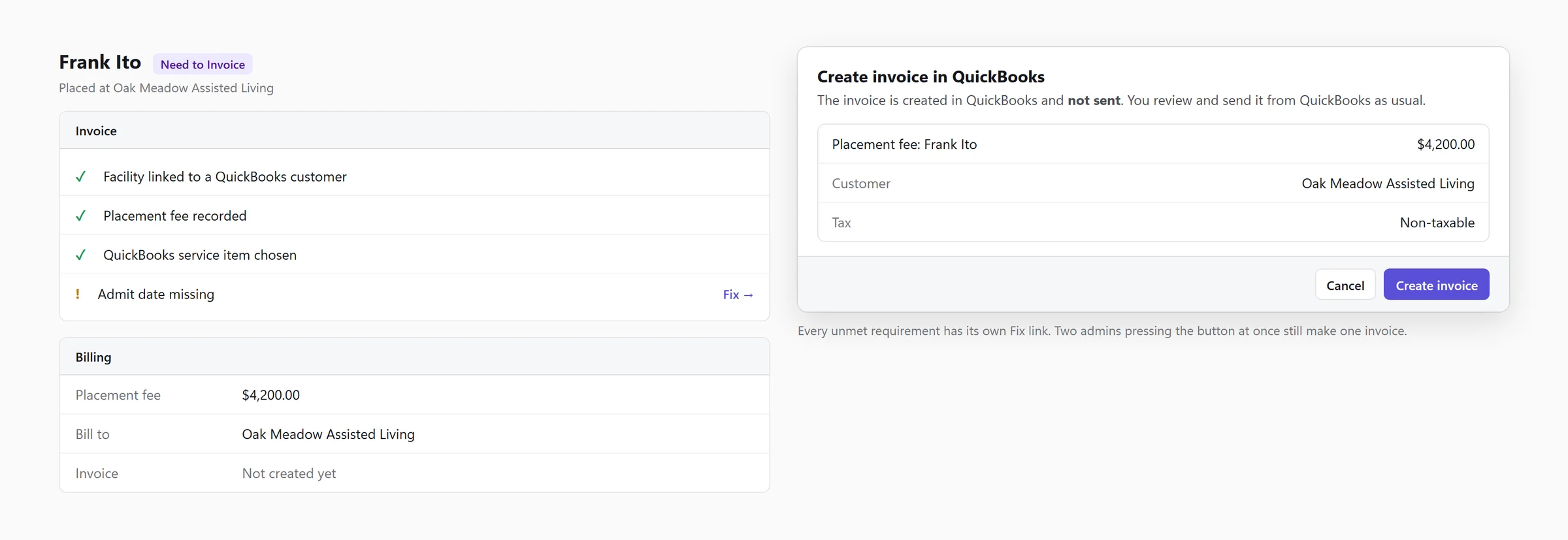
When a client is admitted, an admin opens the invoice panel. The panel lists anything still missing (no admit date, a facility not linked to its QuickBooks customer), each with its own link to fix it. Then the admin approves, and the invoice is created in QuickBooks. It isn't sent, because Ron wanted to review every invoice in his own books before it goes out. If two admins press the button at the same moment, they still get one invoice. Unpaid invoices raise a daily aging email to admins.
The portal also produces the two documents the team used to assemble by hand: a referral sheet for each facility and a client summary, both as branded PDFs.
A guide built into the portal
Instead of a PDF manual that goes stale, the portal has a guide with 29 topics, filtered by role, and "Show me" tours that highlight the real button on the live screen. Automated checks fail if the guide mentions a button that no longer exists.
How we worked
We started from their documents
Before scaffolding anything, we wrote a build spec from Anew's developer brief, their client intake reference sheet, the Excel export and the SharePoint lists. The intake sheet changed our plans more than once. For example, we had planned to merge "Pending" and "Follow-Up" until the sheet showed they meant different things: one is on track for admission, the other has stalled.
"I am very impressed with your knowledge and your attention to detail and the way you forward think about how this will be used."
Ron Plummer, 10 September 2026, after answering our business-logic questions
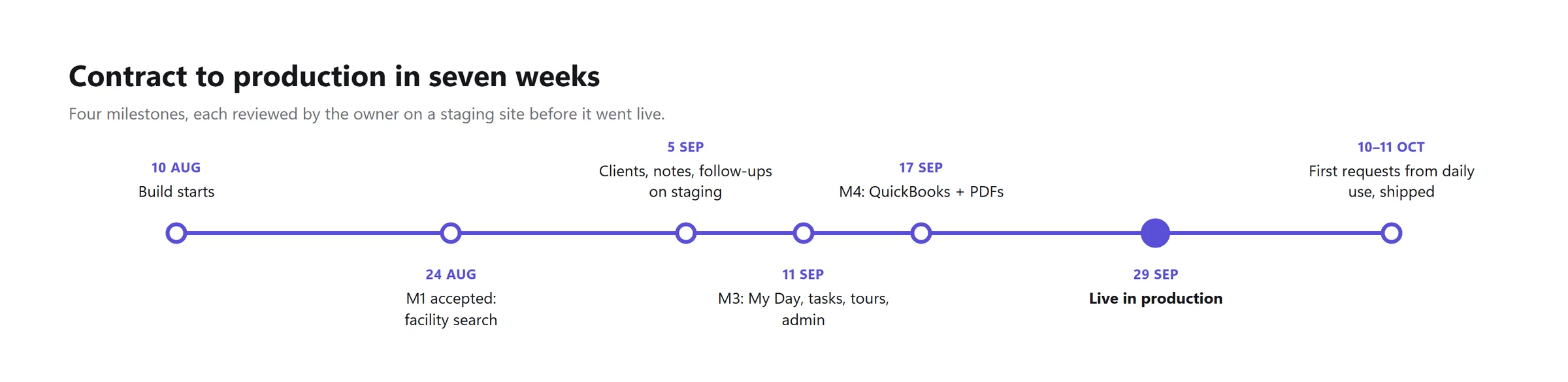
Four milestones, each reviewed on a staging site
Facility search came first and was accepted on 24 August. Clients and follow-ups followed, then My Day, tasks, tours and the admin dashboard, then QuickBooks and the PDFs. Ron reviewed each one on a staging copy holding his real data. After Milestone 2 he wrote, "As usual you exceeded expectations. I played with it both on computer and phone this morning," and the next day the team gave it what he called "a thorough workout". Their notes went straight into the next round.
Moving the data
The client spreadsheet had 1,200 rows. 534 of them were real clients and the rest were padding. Twenty groups looked like duplicates. We decided them by written rules and showed every decision to Ron rather than guessing. Rows we couldn't place went to a review list, never into the database. On launch day we caught up to the latest export and checked every record against the source. Every difference traced back to a correction Ron had asked for.
Keeping client data private
Anew's records include health details about older adults. Sign-in uses the team's existing Microsoft accounts. Staff never see billing fields. Every change is logged with who made it and when, and admins can see every sign-in. All the screens in this article are mock-ups with invented names.
The results
The portal went live at Anew on 29 September 2026, seven weeks after the build started. That night Ron wrote: "Thanks so much, we are looking forward to this portal. I believe it will be a game changer for us."
- Clients, facilities, tours, tasks and billing all live in the portal, and My Day replaces the twice-daily OneNote rebuild.
- 572 client records moved from the spreadsheet, every one assigned to an advocate and checked against the source.
- 12 automations cover reminders, escalations, check-in tasks, admin alerts, the aging email and client emails, and they run around the clock.
- Ron sent his first list of requests on 8 October, nine days after launch, and it was live on 10 October. His follow-up answers on 11 October shipped the same day.
We haven't measured the time saved yet. The portal has been live for under three weeks, and we'd rather report a measured number than an estimate. We'll update this page once we've reviewed a full month with Anew.
What we learned, including what went wrong
Leaving out the old system's workarounds
The OneNote log had a "patients to enter into Excel" list. It existed only because entry and tracking were separate tools, so we didn't build it. We also dropped a "daily objective" feature we'd planned, after Ron told us the OneNote version had never really caught on.
Requests from daily use
On the first day the team asked to delete and restore records, which nobody had raised in six weeks of review. A week later they asked for anyone to be able to complete any task, with a note of who finished it. Both shipped within days.
The launch date moved
The build window closed on 18 September, but going live waited on Intuit's production approval for the QuickBooks connection (granted 25 September) and on Ron's review of the last two milestones. We launched on 29 September. Launching any earlier would have meant going live without billing.
Is this right for your business?
If your team runs on a spreadsheet, a shared notebook and a set of reminders that only work when someone remembers them, you may not need a large off-the-shelf CRM. A portal built around your own statuses and forms, connected to the accounting software you already use, can be live in weeks.
Book a discovery call and tell us what your team retypes most often.